
Download HiveFlux – collaborative task manager, free productivity tool, real‑time workflow
Overview
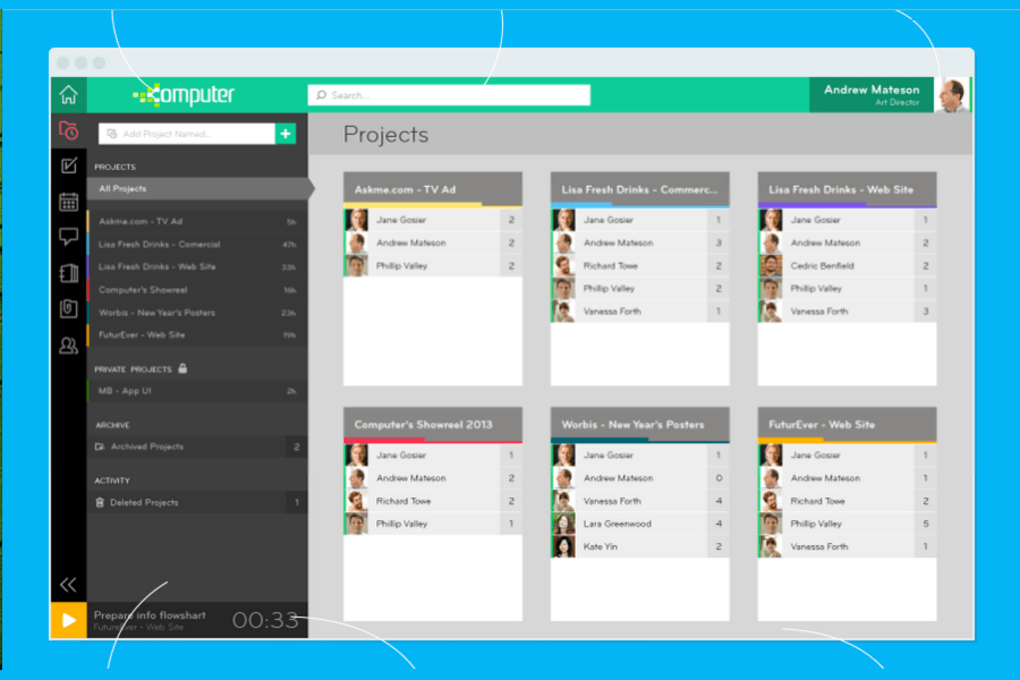
HiveFlux is a modern productivity tool designed for teams that need a clear, visual way to plan, share, and track work. Unlike a simple to‑do list, HiveFlux breaks down projects into bite‑sized tasks, assigns ownership, and displays real‑time status updates so every team member knows who is working on what, when a task is started, paused, or completed. The platform encourages “deep work” by signalling to coworkers when a task is in progress, reducing interruptions and helping users stay in the zone.
Whether you are managing a daily sprint, a weekly roadmap, or a monthly strategic plan, HiveFlux provides a single pane of glass where work can be organized, prioritized, and communicated instantly. The service also supports notifications for task acceptance, progress changes, and completions, which makes collaboration feel natural and frictionless. By turning task management into a shared, transparent experience, HiveFlux helps teams improve focus, reduce context‑switching, and ultimately deliver higher‑quality results faster.
Key Features
- Real‑time task status – instantly see when a task is started, paused, or completed.
- Task assignment with acceptance workflow – assign, track acceptance, and get notifications.
- Day, week, and month planning views – switch between granular daily lists and broader timelines.
- Focus mode – automatically sets a “do not disturb” flag for teammates when you begin a task.
- Collaborative commenting – add context, files, or links directly to a task.
- Custom labels and priority tags – colour‑code tasks for quick visual scanning.
- Cross‑platform sync – work on Windows, macOS, Android, or iOS and keep data in sync.
- Export & import – CSV and JSON support for bulk task migration.
- Secure cloud storage – end‑to‑end encryption and role‑based access controls.
- Integrations – connect with Slack, Microsoft Teams, and popular calendar apps.
Installation & Usage Guide
Getting started with HiveFlux is straightforward and can be completed in under ten minutes. Follow these steps to install the application and begin managing tasks with your team:
- Download the installer: Visit the official HiveFlux website and click the Download for Windows (or macOS, Android, iOS) button. The file is signed and verified, ensuring a secure download.
- Run the installer: On Windows, double‑click the
.exefile and follow the on‑screen prompts. macOS users will open the.dmgand drag the app to the Applications folder. Mobile users simply tap the store link to install from Google Play or the App Store. - Create an account: After launch, you’ll be prompted to sign up with an email address or use single sign‑on (SSO) via Google or Microsoft Azure AD. Choose a strong password and verify your email.
- Set up your first workspace: A workspace represents a team or project. Name it, invite colleagues by email, and assign role permissions (admin, manager, contributor).
- Build your task hierarchy: Click “New Project,” then add phases, milestones, and individual tasks. Each task can be broken down into sub‑tasks, given a due date, priority level, and optional label.
- Assign and start work: Drag a task to a teammate, add a brief description, and click “Assign.” The assignee receives a notification and must click “Accept” before work can begin. Once accepted, the task status automatically switches to “In Progress” and a focus flag is shown to other members.
- Track progress: Use the “Board” view for Kanban‑style monitoring or the “Timeline” view for Gantt‑like planning. Real‑time updates appear instantly across all devices, eliminating the need for manual status reports.
- Leverage integrations: Connect HiveFlux to Slack to receive push notifications, or sync with Outlook/Google Calendar to automatically add task due dates as calendar events.
- Export data: When a project ends, export the task list as CSV for archival or reporting purposes.
HiveFlux also includes a built‑in tutorial that guides new users through each feature with interactive pop‑ups. The tutorial can be re‑launched from the Settings menu if needed. Regular updates are pushed automatically, ensuring you always have the latest security patches and feature enhancements without manual intervention.
Compatibility & System Requirements
HiveFlux runs natively on all major operating systems, making it a versatile choice for mixed‑device teams.
- Windows: Windows 10 (64‑bit) or later. Minimum 2 GB RAM, 200 MB free disk space.
- macOS: macOS 11 (Big Sur) or later. Minimum 2 GB RAM, 200 MB free disk space.
- Android: Android 8.0 (Oreo) or newer. Requires 100 MB storage and 1 GB RAM.
- iOS: iOS 13 or newer. Requires 100 MB free storage.
Because HiveFlux stores data in the cloud, you can also access a lightweight web version through any modern browser (Chrome, Edge, Firefox, Safari). The web client respects the same permission model and provides real‑time sync, so you never lose access even if you’re on a public computer.
For enterprises with strict compliance requirements, HiveFlux offers an on‑premises deployment option that can be installed on private servers or within a virtual private cloud. This version respects the same feature set while giving IT teams full control over data residency and encryption keys.
Pros & Cons
Advantages
- Real‑time visibility eliminates status‑meeting overhead.
- Focus mode reduces interruptions and supports deep work.
- Cross‑platform support ensures every team member can participate.
- Intuitive drag‑and‑drop interface requires minimal training.
- Secure cloud storage with end‑to‑end encryption protects sensitive data.
- Free tier available for small teams, with affordable premium plans for larger organizations.
Disadvantages
- Advanced reporting features are limited to paid plans.
- On‑premises deployment requires separate licensing and IT expertise.
- Notification overload can occur if too many tasks are assigned without proper filtering.
- No built‑in time‑tracking beyond start/stop status (requires third‑party integration).
Frequently Asked Questions
Is HiveFlux free to use?
HiveFlux offers a completely free tier that includes unlimited tasks, real‑time collaboration, and basic integrations. Premium plans add advanced reporting, custom branding, and priority support.
Can I integrate HiveFlux with my existing Slack workspace?
Yes. HiveFlux provides a native Slack integration that sends notifications for task assignments, status changes, and deadline reminders directly to selected channels or direct messages.
How secure is my data on HiveFlux?
Data is encrypted at rest and in transit using AES‑256 and TLS 1.3. Role‑based access controls let administrators restrict who can view or edit specific tasks. For regulated industries, an on‑premises option is also available.
Does HiveFlux work offline?
The desktop and mobile apps cache recent tasks, allowing you to view and edit them offline. Changes sync automatically once an internet connection is re‑established.
Can I export my tasks for reporting purposes?
Yes. HiveFlux lets you export any project or workspace as CSV or JSON. This feature is useful for creating custom reports, feeding data into BI tools, or archiving completed work.
Conclusion & Call to Action
HiveFlux fills a critical gap between simple to‑do lists and heavyweight project‑management suites. By emphasizing real‑time status, focus mode, and seamless cross‑platform collaboration, it empowers teams to work together without constant interruptions. The free tier is generous enough for startups and small departments, while the premium offering scales to enterprise needs with added analytics and dedicated support. If you’re looking for a tool that helps your coworkers see when you’re “in the zone” and reduces the need for endless status meetings, HiveFlux is a strong candidate.
Ready to boost your team’s productivity? Download HiveFlux now and start organizing work in a way that truly supports focus and collaboration.
HiveFlux offers a clean interface, reliable real‑time updates, and a useful focus mode that genuinely reduces interruptions. The free plan is generous, and the paid tiers unlock powerful reporting tools. Minor drawbacks include limited native time‑tracking and occasional notification fatigue, but these are outweighed by the overall productivity gains.
- Pros: Real‑time visibility, cross‑platform, secure, free tier.
- Cons: Advanced reporting locked behind paywall, no built‑in timer.



.png)



